How Dentists Can Get More Google Reviews After Every Appointment
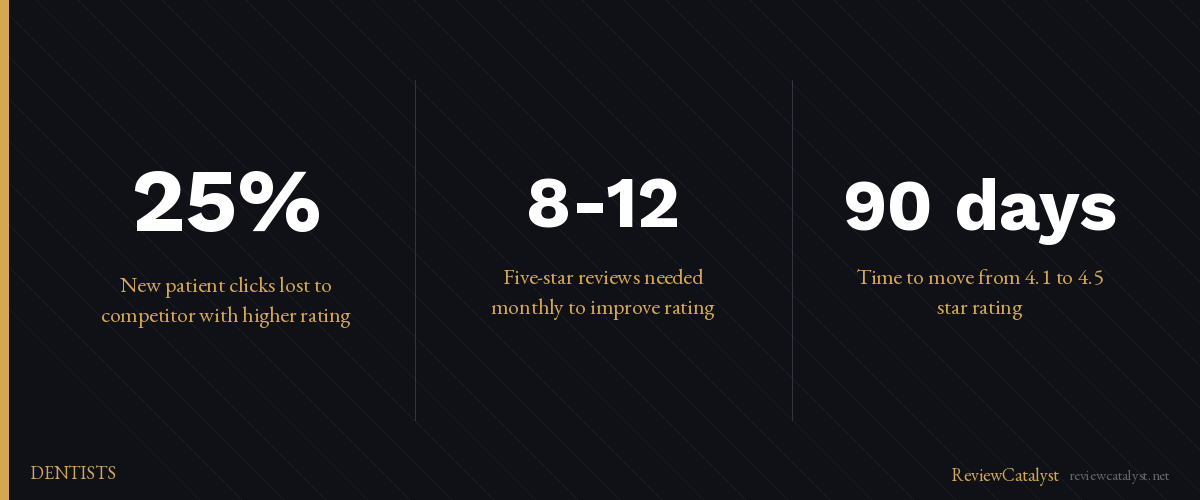
A dental practice with a 4.2-star rating loses roughly a quarter of new-patient clicks to the competitor down the street with a 4.8 rating. The difference isn’t the quality of care. It’s visible on Google before a patient ever picks up the phone, and it costs you new appointments every month.
The fix isn’t asking harder. It’s having a system. Most dental practices don’t have one — they ask some patients, inconsistently, and hope word-of-mouth fills the gaps. Meanwhile, competitors with automated review requests pull ahead. Not because they’re better dentists. Because they’re better at capturing the reviews their patients are already willing to leave.
Getting more Google reviews doesn’t require bribing patients or asking relentlessly. It requires asking at the right moment, in the right way, and doing it consistently enough that reviews accumulate. Here’s how to build that system.
Why Google Reviews Are Your Biggest Patient Magnet
New patients don’t call you because they heard a rumor. They call you because they Googled “dentist near me,” saw your 4.8-star rating, and trusted it more than your website.
Your Google rating is the first impression you get to make. It sits above your hours, your phone number, and your location in the search results. A low rating costs you new patient calls every single month — and the call you don’t get is one your competitor does.
The good news: the math works in your favor once you start asking. A handful of new five-star reviews can shift a borderline 4.0 into a confident 4.4 in a few months. That shift moves you from “maybe” to “yes” in a prospective patient’s head.
The Problem With Asking Patients for Reviews Manually
You already know reviews matter. So why don’t you have more?
Most dentists ask some patients for reviews — usually at the end of the appointment, while the patient is trying to schedule their next visit and pay their balance. You mention it. They nod. Then they leave, forget, and never go home and write anything.
Here’s what happens when you rely on remembering:
You forget to ask. Even if you intend to ask every patient, you won’t. You’re thinking about the next appointment. A patient had a question. You got distracted. Fifty patients a month slip through without ever being asked.
You ask at the wrong moment. Checkout is chaos. Patients are thinking about their bill, their next appointment, whether their copay went through. That’s not when they’re ready to leave a review.
Even satisfied patients hesitate when you ask verbally. It feels like a favor. They’re polite, they mean well, but they’re busy. The problem isn’t your patients. It’s the method. Text them the next day with a one-tap link, and the response rate climbs.
You can’t scale it. Even if you asked 100% of patients, you’d get a handful of reviews a month. That’s not enough to move your rating or stay competitive. You need a system that captures reviews from dozens of patients automatically.
Why Appointment-Based Dentists Need SMS + QR Code
Dental practices have a structural advantage most local businesses don’t: a captive 2-3 minute window at checkout, and a known follow-up window the day after. A two-pronged approach captures reviews in both.
SMS requests reach patients when they have time. Texts get read quickly — far faster than email. A brief, friendly request the day after the appointment lands when the patient still remembers their experience and has a few seconds to tap a link. No buried inbox. No hoping they remember.
QR codes work right at the payment desk. Before they leave, your patient is at the front counter, wallet out, ready to go. A small sign — “Scan to share your experience” — lets them open their phone camera, point it at the code, and land on a review form instantly. No typing a URL. No searching for your Google page. One scan.
Combining both methods captures reviews from patients who’d respond to one but not the other. Some patients will scan at the desk and never read a text. Others will ignore the sign and respond to the SMS that night. You meet them where they are.
The Step-by-Step System Dentists Use
Here’s how this works in practice:
Step 1 — Send an SMS request the day after the appointment. Your system automatically sends a text to patients who completed their visit. Brief, friendly, with a direct link they can tap: “Thanks for visiting us today! Would you mind sharing your experience? [link]”
Step 2 — Place QR codes at your front desk, checkout area, and receipts. Frame a branded QR code near your payment window. Print it on receipts. Include it on appointment reminder cards. Every touchpoint is an opportunity.
Step 3 — Route patients to the platform that matters. When patients tap your SMS or scan your QR code, they land on a single page where they can choose Google, Facebook, or another platform. Most will choose Google — which is exactly the platform that drives new patients.
Step 4 — Respond to every review. Don’t skip this step. The way you respond to reviews matters as much as collecting them, and we cover the specifics below.
How to Write an SMS Review Request Dentists Actually Send
The SMS itself matters. Keep it short. Keep it simple. Keep it friendly.
What works:
- Keep it under 160 characters so it displays as one text, not two
- Don’t frame it as a favor. Frame it as a chance to share their experience
- Include a direct, clickable link they can tap immediately
- Mention Google specifically — it’s the platform that matters most for local search
Example:
“Hi [Patient Name]! Thanks for visiting us. Would you mind sharing your experience on Google? [link] Takes 60 seconds. Thanks!”
That’s it. Friendly, specific, and actionable.
Using QR Codes to Capture Reviews at Checkout
QR codes work because they remove friction. A patient doesn’t have to remember your name or search for you later. They scan, they land on your feedback form, and they’re done.
Print them on receipts. Every patient gets a receipt. Add a small QR code at the bottom with a line: “Share your experience.”
Frame them at the front desk. A small, attractive sign near your payment window. Most patients will see it while waiting.
Hand them with a business card. If a patient mentions they had a great experience, hand them a card with your QR code: “If you get a chance, we’d love your feedback.” They’ll scan it right there, or later at home.
What happens when they scan. They land on a branded feedback page. They choose their preferred review platform or leave private feedback for you. Done.
How to Handle Negative Reviews (Before They Tank Your Rating)
You will get negative reviews. Every practice does. The difference between a 3.8-star practice and a 4.5-star practice isn’t that one never gets complaints. It’s that one responds to every review.
Respond within 24 hours. A response shows prospective patients that you read feedback and care about their experience. A review sitting unanswered for weeks signals that you don’t.
Address the specific issue, not just the emotion. Don’t write: “Sorry you had a bad experience. We pride ourselves on great care.” Try: “We’re sorry the wait was long that day. We’ve adjusted our scheduling to reduce wait times. Please call us directly — we’d like to make this right.”
Turn one negative review into proof you care. A low review with a thoughtful, specific response from you is often more convincing to new patients than a row of five-star reviews with no replies. It shows you’re real, you listen, and you try to fix things. For the full playbook, see our guide on how to respond to negative Google reviews without making it worse.
Automating the Entire System
Once it’s set up, you don’t have to remember to ask anymore.
You can automate SMS requests to send the day after each appointment. You can set them to land at the time of day when patients are most likely to respond — early evening works for most practices. You can run different messages for different appointment types: a shorter ask after a cleaning, a slightly different one after a longer procedure where the patient may need a day or two to settle in before being asked.
You can also automate the part you’ll skip otherwise: response drafts. Most review platforms now offer AI-assisted reply drafts you can edit and approve in seconds, so a 24-hour response window is realistic even on a busy week.
The point of automation isn’t to remove the human touch. It’s to remove the forgetting. You stay in charge of tone and edits. The system handles “did we actually ask this patient yet?”
How Many Reviews Do You Actually Need to Move Your Rating?
The math is friendlier than most dentists think.
If you’re sitting at 3.8 stars with 40 reviews, you don’t need 200 new five-star reviews to get to 4.5. A steady drip — 8-12 new five-star reviews a month — will pull your average up over a quarter or two. A practice that captures one review from each business day is well past that pace.
What new patients are watching for:
- Recent activity. A practice with reviews from this month reads as alive. A practice whose last review was two years ago reads as closed.
- Volume above the local threshold. In most metros, 4.5 stars with 200 reviews beats 4.9 stars with 14. Patients trust the bigger sample.
- Visible responses. Even a few thoughtful replies on older reviews change how the whole page reads.
The smallest reliable shift — one practice we work with moved from 4.1 to 4.5 in 90 days — was almost entirely the result of switching from manual asks to automated SMS plus a checkout QR code. They didn’t change anything about the dentistry.
For the wider context on what review systems do for dental practices, see our practical guide to online reputation management for dental offices.
Every week without a review system is a week your competitors pull ahead. ReviewCatalyst sends SMS review requests automatically the day after each appointment, lets patients scan a QR code right at checkout, and centralizes responses in one dashboard — no manual asking required. Start your free 14-day trial at reviewcatalyst.net. No credit card required.
Ready to get more reviews on autopilot?
ReviewCatalyst sends review requests via SMS automatically — no manual follow-up, no chasing customers.
Start Free Trial