How to Get Your First 10 Google Reviews as a New Business
A business with 10 Google reviews gets clicked significantly more often than one with zero—even if both have the same price and location. You have a closing window to build momentum.
If you just opened your doors, you’re in a critical phase. You’re getting customers. But your Google Business Profile is a ghost town. Meanwhile, established competitors with decent ratings are getting more visibility, more clicks, and more walk-ins—simply because they have reviews and you don’t.
The good news: your first 10 reviews don’t take as long as you think. They just require a system.
Why Your First 10 Reviews Matter More Than You Think
The visibility gap is real. When a potential customer searches for your business type in your area, Google’s algorithm considers review count as a ranking factor. A new business with zero reviews ranks lower than an established competitor with 8 reviews, even if your service is better. The search result that appears first gets clicked first.
New customers checking out a new business are already skeptical. They’re not sure if you’re legitimate, if your work is good, or if you’ll be around in six months. A handful of positive reviews answer the question: “Is this place real? Are they good?” Your competitor three blocks away with 12 reviews doesn’t ask customers to take that risk.
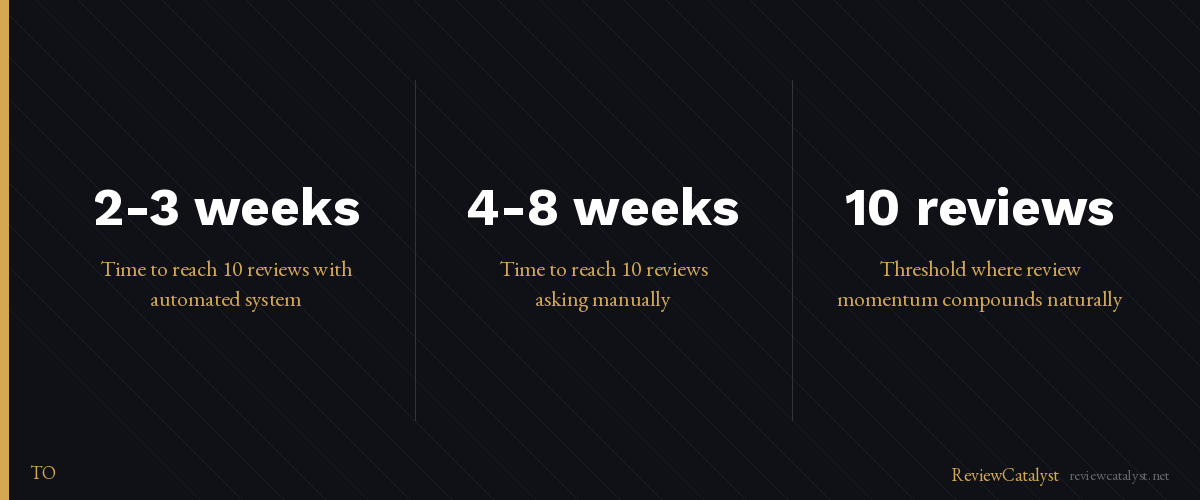
The momentum compounds too. Your first 10 reviews are harder to get than your first 20. Once you hit that threshold, more customers naturally leave reviews because they see others have already shared their experience. You’re climbing out of a hole right now. Get to 10, and the climb gets easier.
The Reality: How Long Does It Actually Take?
If you ask manually—stopping to text or email customers one by one, following up, hoping they remember—you’re looking at 4–8 weeks to hit 10 reviews, assuming you’re getting 5–10 customers per week and half respond to your ask.
If you use a system that sends requests automatically and reminds you who hasn’t reviewed yet, you can hit 10 reviews in 2–3 weeks.
The difference isn’t magic. It’s consistency. Manual asking happens when you remember. Systems make it happen whether you remember or not.
The 3-Step System to Get Your First 10 Reviews Fast
Step 1: Set up your Google Business Profile correctly. Make sure your name, address, phone, hours, and category are accurate and complete. A business with incomplete information ranks lower and gets fewer review requests from customers who find you. Spend 15 minutes getting this right. You can’t get reviews if customers can’t find you.
Step 2: Ask every customer. This is the hard part. Every single customer who completes a transaction is a potential review. Don’t pick and choose. Don’t wait for the “perfect” moment. Ask them right after they experience your service, while they’re still engaged.
Step 3: Follow up with customers who haven’t reviewed yet. Some customers intend to review but forget. A single follow-up text or email 3–5 days later reminds them. Keep it light: “Still here if you’d like to share your experience.” You’ll be surprised how many convert on the second ask.
Where to Ask for Reviews (The Methods That Actually Work)
For field-based businesses (landscapers, cleaners, contractors): Ask in person before you leave the job site. Hand them a QR code printed on your receipt or business card. They scan it on the spot, land on a review page, and can leave feedback immediately. It takes 30 seconds.
For appointment-based businesses (salons, dental, auto, medical): Ask via text message right after their appointment. A text gets opened within minutes. Email can wait. Link them to a simple review page and let them choose how they want to share their experience.
For e-commerce or online service businesses: Ask via email after delivery or service completion. Time it to land in their inbox when the experience is fresh. Include a direct link to your review page.
The mistake most new businesses make: They ask too late or too vaguely. “We’d love your feedback” doesn’t work. “Please leave us a review on Google” works better, but it requires customers to find you. A direct request, in the moment, with a link ready to go—that’s what converts.
What to Say When You Ask for a Review
Keep it simple. Here are templates by business type:
Field-based: “Hey [name]—thanks for letting us help with [service]. If you got great results, would you mind leaving a quick review? Scan this code or text me.” (Then provide the QR code or link.)
Appointment-based: “Thanks for coming in today! If you’re happy with your experience, would you take 30 seconds to leave a review? Just tap here: [link]”
Hospitality/food service: “Thanks for dining with us! We’d love to know what you thought. Leave a review: [link]”
The phrase that gets the most responses is: “Would you share a quick review?” It’s direct, it’s straightforward, and it makes the ask easy. Send all customers your feedback link—they can share their thoughts on Google, Facebook, or another platform that matters to them.
How to Turn Reviews Into More Customers
Once reviews start coming in, display them on your website. A live review widget on your homepage builds trust with new visitors and gives them the social proof they’re looking for before they call.
Respond to every review, not just the negative ones. A simple “Thank you so much!” on a five-star review shows you’re engaged and professional. It also signals to future customers that you care about feedback.
Use reviews in your marketing. Share positive reviews in your email signature, on your social media, in your Google Business Profile introduction. Let your customers’ words do the selling.
The Fastest Path: Stop Asking Ad Hoc
Here’s the truth: asking manually works until it doesn’t. Once you’re getting 10+ customers a week, remembering to ask every single one becomes another task on an already-full plate. You’ll ask some customers and forget others. Response rates drop. You plateau at 8 reviews and stay there for months.
Every customer you serve is a potential review—but only if you ask. The difference between 10 reviews and zero reviews isn’t the quality of your work. It’s a system that asks every customer, automatically, at the moment they’re most likely to say yes.
ReviewCatalyst does this for you. Send review requests via SMS or QR code (field-based), text (appointments), or email (online services)—and track who’s responded so you can follow up. No more remembering. No more hoping. Just consistent asks that convert to reviews.
Try ReviewCatalyst free for 14 days at reviewcatalyst.net—no credit card required. See how fast you can hit 10 reviews and build the momentum that keeps going.
Ready to get more reviews on autopilot?
ReviewCatalyst sends review requests via SMS automatically — no manual follow-up, no chasing customers.
Start Free Trial