How to Get Google Reviews via SMS (and Why It Works Better Than Email)
A customer just walked out of your salon after a great appointment. You hand them a business card with a handwritten note: “Please leave us a review on Google.” They nod, smile, and throw it in their pocket.
You’ll never hear from them again.
That card will sit in their car for three weeks before getting tossed. Even if they meant to leave a review, life gets in the way. By the time they think about it, the moment is gone.
Now imagine a different scenario. Five minutes after that same customer leaves, they get a text message: “Hey! Thanks for coming in. Would you mind sharing your experience? [link]”
They read it immediately. They click the link. They leave a review — right there, while they’re still thinking about how great their service was.
This is not theory. Text messages get opened in minutes. Email gets deleted unread. The difference is not small. It’s the gap between a consistent review pipeline and chasing customers down manually.
Here’s why SMS review requests work, when to send them, and how to set it up so you stop fighting for reviews.
Why SMS Review Requests Work Better Than Email
Open Rates: The Gap Is Real
Text messages get read almost immediately. Emails? They sit in an inbox with dozens of others and often never get read at all.
This is not because text is better at everything. It’s because text hits different psychologically. An email is one of hundreds competing for attention. A text feels personal. It requires acknowledgment. Phones buzz for texts in a way they don’t for email.
For a business asking for reviews, this gap changes everything. You’re not trying to win a click in a crowded inbox. You’re trying to catch a customer while they’re still thinking about your service.
Response Time: Minutes vs. Days
When a customer gets an SMS review request, they respond in one of two ways: immediately, or never.
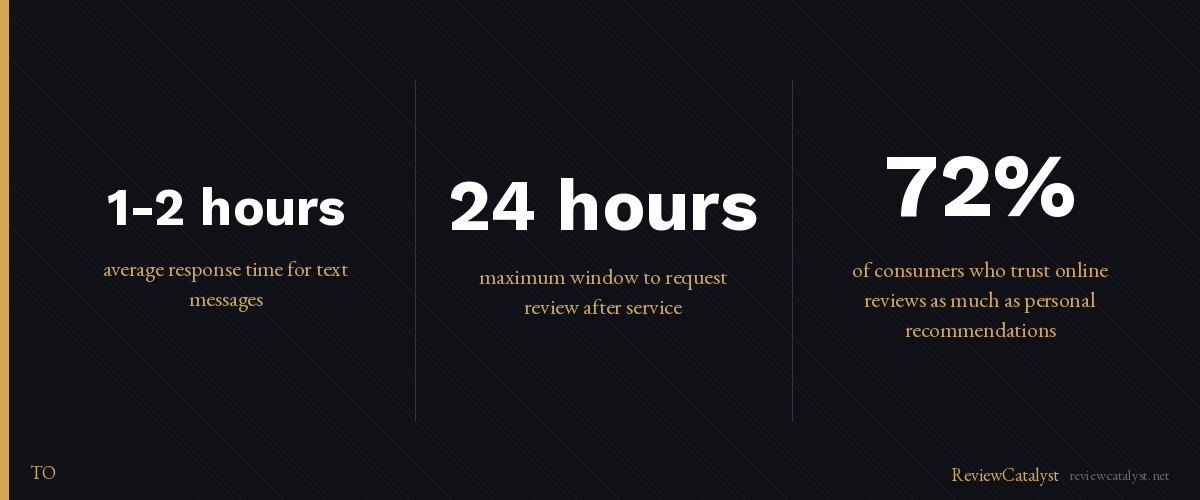
There is almost no middle ground. The average text response happens within an hour or two. Emails? If they’re read at all, responses typically come days later — if at all.
The timing matters because when you ask right after service, customers actually respond. They remember the details. Their satisfaction is fresh. Wait a week? They’ve moved on. You’ve lost the moment.
The Psychology of Text vs. Email
Email is noise. Text is signal.
Your customers expect dozens of emails daily. They do not expect dozens of text messages. A text stands out. It also creates a subtle sense of urgency — not through aggression, but through familiarity. Text is how friends communicate, not how businesses usually contact them.
When you ask for a review via SMS, it lands differently. It feels less like a marketing ask and more like a genuine request from someone who served them.
When to Send an SMS Review Request
The Sweet Spot: Right After Service
The best time to ask is the moment the transaction is complete — or within the same day, at most.
For appointment-based businesses (salons, dental, auto repair, spas), this is right after the customer leaves. For restaurants, it’s an hour after they’ve finished eating. For home services, it’s the same day the job is done.
Send the request while the experience is still vivid. Don’t wait until tomorrow. Don’t send it three days later hoping they’ll remember.
Avoid These Timing Mistakes
Don’t text before the service is done. Wait until they’ve left or the appointment is complete. More than 24 hours later and the psychology shifts — you’re no longer the business they just experienced, you’re a company trying to get something from them. If you’re a plumber who finishes a job at 6 PM, send the SMS at 6:05 PM, not 8 AM the next day. And stick to one text. A second message looks like harassment, not a request.
How to Write an SMS Review Request That Gets Results
Keep It Short
You have one sentence. Use it.
“Hey [Name], thanks for choosing us! Would you mind leaving a quick review? [link]” — This works. It’s friendly, brief, and clear.
Don’t write a paragraph. Don’t add multiple asks. One clear request. One link.
Make the Link Easy
A long URL is a barrier. Use a short link or QR code. The fewer friction points between text and review, the higher your completion rate.
Three Templates for Different Industries
A salon might say: “Thanks [Name]! How did we do? Leave a review and let others know: [link]”
A contractor: “Job’s done! Would appreciate a review if you’re happy with the work: [link]”
A restaurant: “Thanks for stopping by! Share your experience: [link]”
The common thread: gratitude first, request second, link third.
The SMS vs. Email Debate
If you’re wondering whether to use SMS or email, ask yourself this: Do you have phone numbers?
If yes, use SMS. If you don’t have phone numbers but you have emails, use email. If you have both? Start with SMS. It will generate most of your reviews. Email becomes a secondary channel for customers who don’t text or didn’t see the initial request.
Using both simultaneously is overkill and dilutes your message. Customers who get texted about reviews don’t need an email about the same thing three days later.
SMS is non-negotiable for field-based and appointment-based businesses. You’re already collecting phone numbers. You’re already communicating via text with booking confirmations or service updates. Adding a review request to that flow takes one minute.
The Compliance Angle: Why SMS Done Right Protects You
Here’s what matters: SMS review requests require customer consent. You can’t text random numbers hoping they’ll leave reviews.
But if you’re collecting phone numbers at checkout or during an appointment — which most businesses already do — you have consent. Make sure customers know they might get a text about their experience. Most won’t mind. Many will appreciate being asked.
Doing this right is both ethical and legally safer than systems that try to manipulate review ratings.
Set Up Your First SMS Review Campaign
If you’re ready to move beyond manual requests, here’s what you need:
Collect phone numbers with consent by adding a checkbox at checkout or during appointment booking: “Text me about my experience.” Choose your timing — same-day requests work best, either sent automatically after service or manually when you remember. Write your message in a way that’s short, warm, and grateful, using a template to stay consistent. Track results by monitoring which customers are opening texts and leaving reviews, then adjust your message if needed.
ReviewCatalyst automates this entire workflow. You collect phone numbers, set up one campaign, and texts go out automatically after service. Customers land on a branded page where they can choose their preferred review platform and leave a review. You see everything in one dashboard.
No chasing. No follow-ups. No manual data entry.
Ready to stop asking for reviews and start getting them systematically? ReviewCatalyst automates SMS review requests so your customers share their experience at the perfect moment. Try it free for 14 days — no credit card required. Start at reviewcatalyst.net/register.
Ready to get more reviews on autopilot?
ReviewCatalyst sends review requests via SMS automatically — no manual follow-up, no chasing customers.
Start Free Trial